
(There’s a TL;DR at the bottom of this article if you’re in a rush)
Apps Script is a powerful bridge which enables you to interconnect the many parts of Google Workspace with just small amounts of code. But when your idea becomes too big for its boots, how do you let it evolve into something more?
Google Cloud Platform (GCP) is Google’s offering for everything cloud. Infrastructure, storage, processing, hosting and much more at your fingertips, ready for your next invention. When you move an Apps Script project to this new environment, you can take advantage of a lot of extra things. Let’s talk about it! 🤸
But why, though? 🤔
Moving to GCP comes with a lot of benefits, but there are a couple of things that you have to know before you take the plunge.
Pros
*Why* Should you do this?
Code Maturity 👴
As good as Apps Script is, it isn’t truly a fully-fledged development environment. The web editor isn’t great (although it’s improved substantially over the past few years), and clasp - the CLI tool that lets you develop locally - is a compromise and can become a headache if you introduce git. Taking your codebase to GCP means taking it to a more feature-rich programming environment too - and all the benefits that come with having those features. Features such as modern runtimes, libraries, IDEs, etc. It also makes deploying a CI/CD pipeline easy, as you can incorporate Cloud Build - a useful way for deploying your code - into your stack.
Scalability 📈
Running your code on Apps Script means you’re at the mercy of the quotas. While most scripts written will never hit them, there’s a chance that your project might.
Once your project starts taking off, you won’t need to worry about the resources and quotas, as GCP offers elastic scalability on its serverless compute offerings. This is a major benefit over Apps Script, as you won’t have to worry about coming up against restrictive quotas. The environment you build your solution in on GCP will inevitably be more extensible, too, so you can build your solution over time as you see fit.
Visibility 👀
Once on GCP, it’s easy to incorporate more sophisticated logging, monitoring and analysis into your project. GCP offers nice features such as health checks and alerting, making it easy to track your app and take action if something goes wrong. This is great for applications that are turning business-critical. The more users you have relying on your system, the higher the cost of the system going down. GCP has tools to help you prevent or foresee these failures.
Cons
It's not all ☀️sunshine and rainbows🌈, though. Moving to GCP is a big move, and chances are you may not actually need to move. Your project may be able to stay on Apps script and live happily ever after. Make sure to review the pros and cons and make an informed decision.
Added Cost
Apps Script is free to use. However, With GCP, you’ll be billed for your usage once you use enough resources. It’s generally quite low initially, though, especially if you architect your solution well. But your costs will increase over time alongside your usage, so beware!
Note that GCP has a very generous free tier - so you can get started for nothing if you’re frugal enough.
Architectural Overhead
When you create a solution with Apps Script, you don’t have to worry about infrastructure. Your code lives in an abstract execution environment which is totally out of your hair. You write the code, create the triggers, and get on your bike. When it comes to GCP, it’s not that simple. You will have to spend time to figure out the best solution for your application. Selecting your architecture stack will depend on your team's budget, SLOs, and skill.
Below we outline a path for you that should help you make your first architectural choices when moving to GCP.
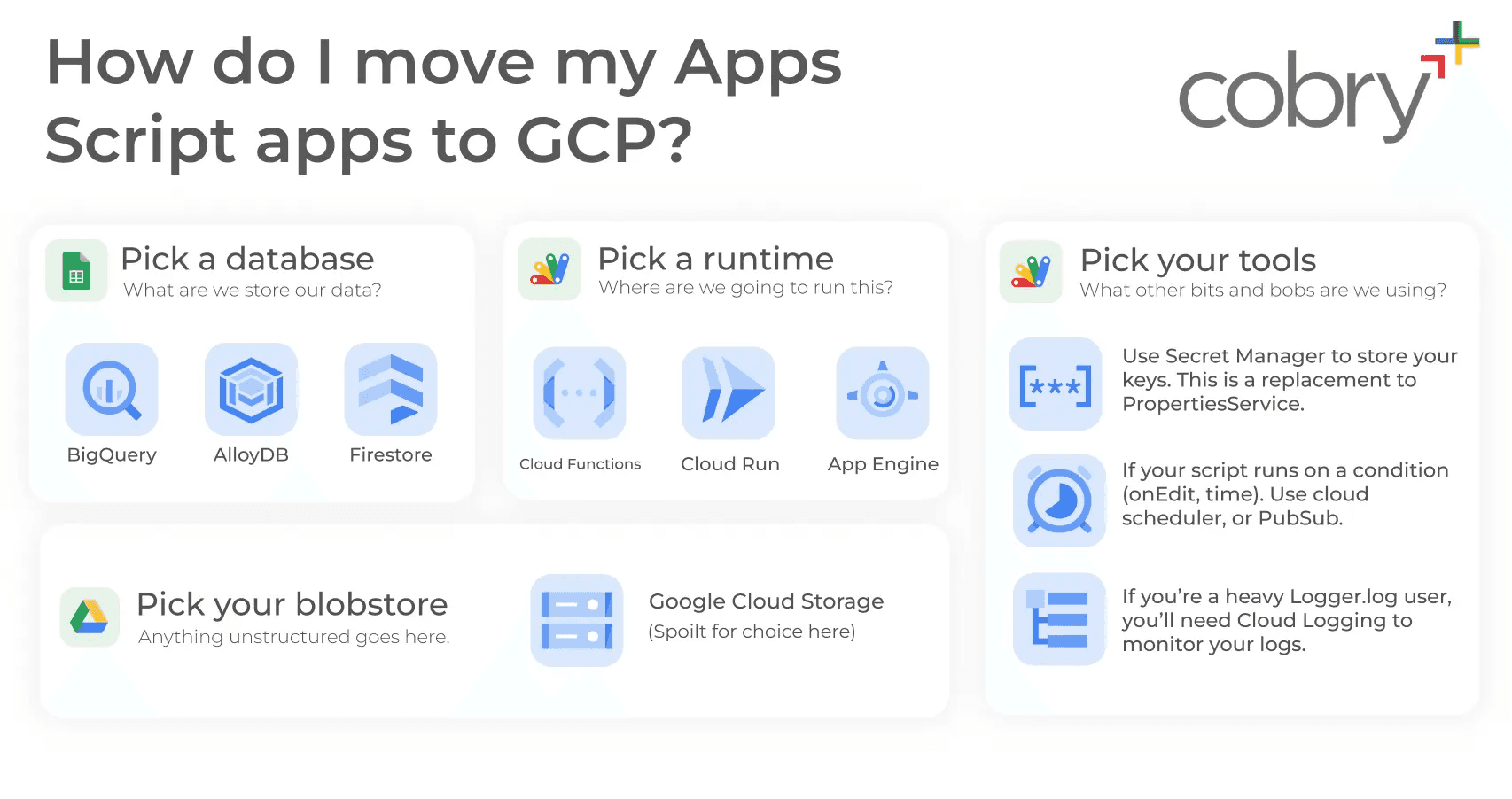
First off - The Code 💾
The first and foremost thing you’ll be thinking is “Where do I put my code?” - and the answer depends on a couple of things. If you want to hit the ground running, the simplest solutions are Cloud Functions and Cloud Run.

Cloud Functions
Cloud Functions is the closest thing on GCP to your familiar Apps Script development experience. If you’re a complete newcomer to GCP, we recommend you start here. Cloud Functions is a serverless, event-based execution environment, best suited for instantaneous or sporadic workloads. Cloud Functions is most similar to Apps Script, which is also largely an event-based environment too. You can run many different languages with Cloud Functions, and have it respond to events such as HTTP requests, cron jobs, message queues, and events generated by other things in GCP - such as file uploads - and more.
We’ve used Cloud Functions to process daily data extractions from APIs, as a handler when users upload files to Google Cloud Storage, to create chatbots, and to run instantaneous web-scraping workloads (among other things).
Case Study: Updateli for Workspace
Updateli for Workspace is a Google Chat bot which we created at Cobry to keep up with all the latest updates to Google Workspace hot off the press. It was originally built on Apps Script - but when we saw its true potential, we decided to release it to the world and migrated it to Cloud Functions. This enabled us to take better advantage of the Workspace APIs and interconnect the app with other components of GCP, such as Firebase. We were also able to create analysis dashboards with Looker thanks to our live database and could monitor the health and state of the app with GCP’s Logging capabilities. Ultimately, while the Apps Script version was a great proof of concept, GCP took it to the next level and made it fit for the big bad world.
Here’s a blog on how we architected it.
Cloud Run
If you’re running a web app on Apps Script using doGet(), Cloud Run is your closest service on GCP.
Cloud Run is similar to Cloud Functions in that it’s also a serverless execution environment, but the largest difference is that Cloud Run supports more sophisticated runtimes, such as Docker containers. It’s great at running websites and RESTful APIs because it scales up and down automagically according to demand. It integrates with Cloud Build and Github seamlessly to give you a CI/CD pipeline at the drop of a hat.
We’ve used Cloud Run in the past to host web apps and micro services containerised using Docker.
How do I move my code, then?
Here are a few considerations around copy-and-pasting your Apps Script into GCP.
API Calls
Apps Script provides services natively for you to use without any configuration, such as the DriveApi and SheetsApi services. When you move to GCP, you will have to replace these calls with your own implementation of the Google client libraries for your chosen language. The Node library is called googleapis and is available on npm here. It contains a lot of helpful examples and guidance as to how to use it.
Generally, the client libraries require a simple authentication call before you can call the relevant APIs, which is an extra step over Apps Script, but this does mean that your code is secure against vulnerabilities relating to scope etc. Here’s a comparison of two equivalent functions in Apps Script and GCP:

As you can see, the Node.js code is a fair bit longer than Apps Script, but if you make good use of classes and abstraction, it actually creates a much more robust and reusable solution which you can re-use in the future.
Migrating your code to a new environment does come with a bit of change management. In order to guarantee a smooth transition, your code should take advantage of best practices for your language of choice and keep best design principles in mind. For example, when you switch your Apps Script service calls out for Google client library calls, you might find it more daunting if you haven’t adhered to DRY (Don’t Repeat Yourself) principles. If you’re using OOP languages such as Python, Java and Node, you should make good use of their toolings, such as abstraction, encapsulation, polymorphism etc. Having well written code is key to an easy migration.
Environment Variables
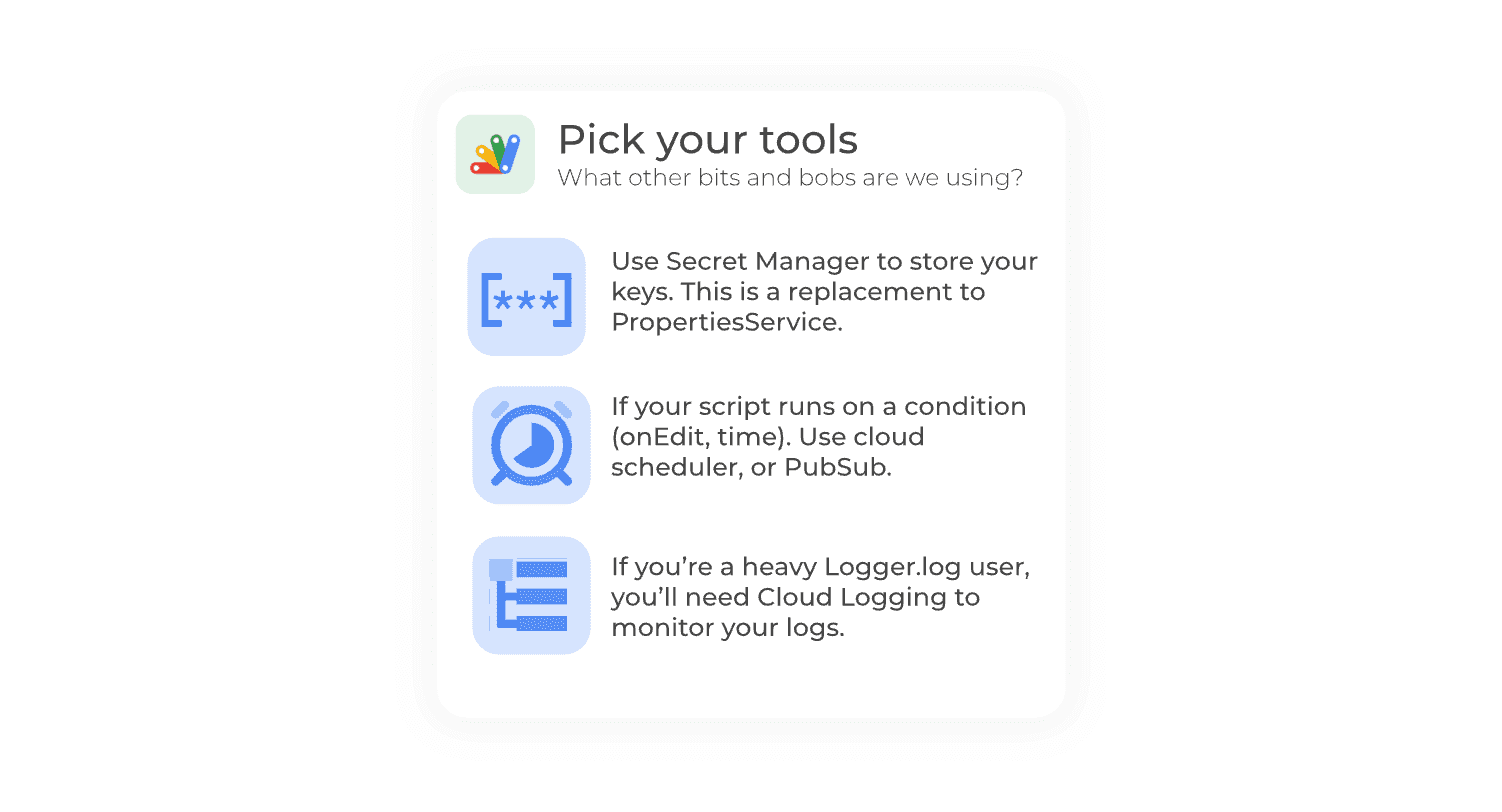
If you’re using the ScriptProperties app, you’ll have to migrate them to your chosen environment. There are a couple of ways to do this. First of all, you could just replace them with constant variables in your code. This is simple but can lead to insecurities if they contain sensitive info like API keys. Secondly, you can use the environment variables in the configuration of Cloud Functions and Cloud Run. This is the easiest and provides a bit more security as they won’t show up in Github etc. Lastly, you can combine the environment variables with GCP’s Secret Manager to encrypt your environment variables. This is by far the most secure option.
What about data? 📦
Being an apps script app, you’ve probably stored your data in a Google Sheet. While this is ideal for apps script, it’s not ideal for GCP because there are many more suitable options for you to choose from.

Sheets? You have three options.
Are you storing transactional data or analytical data in your Google Sheets? If you don’t know, transactional data is the type of data you’d use to run an application - user information, product information; these tables usually aren’t too big. On the other hand, analytical data is used for tables that don’t have many relationships, and the records themselves don’t change much. Usually tall and long. An example will be if you’re recording all of your sales activity or the clicks hitting your website, which is usually analytical data.
More reading can be done here: OLTP vs OLAP. Fortunately, Google has answers for both types of storage.
Transactional: AlloyDB
AlloyDB is an awesome new technology released by Google that is essentially like a Google Sheet on steroids in terms of performance and data capacity. You’ll have to rewrite your
SpreadsheetApp.getValues(“A1”)
function calls to a database function call using the node-postgres npm library which will look something like
const res = await client.query('SELECT $1::text as message', [Hey there!'])
We can’t recommend AlloyDB enough - it’s a great database system, and it’ll scale with your needs.
Analytical: BigQuery
BigQuery is an analytical database with high compatibility with cloud functions and cloud run. It’s ideal if you’re planning to use SQL-like querying, or integrate analytical workflows such as with Looker. If your team is used to Google Sheets, you can set up a connected sheet which syncs the contents of your BigQuery table with Google Sheets, for easier visibility.
We use BigQuery at Cobry as our Data-warehousing solution. This allows us to query all of the data which we collect at Cobry to make business decisions from it. It also hooks up to Looker easily, enabling us to build batch and streaming dashboards for peak business intelligence.
If you want to go rogue: Firebase
Firebase is a NoSQL database with low-latency read-writes. It’s great for mobile apps or anything using json objects. In the past, we’ve used it for all sorts of things and have found that it’s ideal when using Node.js as the client library is easy to use, and there are lots of libraries for things like user authentication etc., that make it very extensible.
Firebase itself can also host your app alone, as well as handle analytics, users, messaging, event handling and a lot more. It has become more self-contained over time and is now a fully-fledged application platform in its own right.
For instance, we used Firebase in our Updateli for Workspace chatbot as a NoSQL database to keep track of chat spaces where the bot is subscribed so that we know where to send messages.
Google Drive: Google Cloud Storage

If you used Google Drive to look for files, your next step up is Google Cloud Storage. You can use GCS buckets to store all your files just as you would use Google Drive Folders to store them.
Cloud Storage is ideal for large volumes of raw data. It gives you the most flexibility, as you can pipe the data to other GCP services once it arrives in GCS. For instance, you can pipe raw data from events into GCS, and set up a dataflow pipeline to process them and store them in BigQuery.
Google Cloud Storage is home to Cobry’s Datalake. This is where we keep all of our raw data in one place, enabling us to build data pipelines and processes however we want.
Ultimately, the database you choose to use will depend on your specific use cases.
TL;DR 🗿
Migrating your Apps Script project to GCP can take some work, depending on the complexity of your project and the design principles which you’ve taken into account.
⚙️ You can use Cloud Functions or Cloud Run as an execution environment, but you’ll need to refactor your script to use the client libraries of your chosen language, rather than the services built into Apps Script.
Trigger your function by using Cloud Pub/Sub, HTTP triggers, cloud scheduler, or GCP resource events
🔥 You should replace google sheets with a robust database solution, such as Firebase, to guarantee performance.
🧭Make sure to set up Cloud Logging and alerting to make the most of your new infrastructure. As a stretch goal, you can set up data analysis with tools like Looker to monitor usage and performance.
Still confused?
If you’re trying to make the most out of GCP, get in touch with Cobry to see how we can take your infrastructure to the next level ☁️🚀
Master Google Apps Script
To make the most of GCP's power, it helps to have a rock-solid foundation in Apps Script. Whether you're a beginner or just need a refresher, these guides are essential.
The Basics: Start with our comprehensive guide, Google Apps Script 101: Everything you need to know.
Practical Automation: See how you can automate your workflow with Google Apps Script to save time on repetitive tasks.
Quick Start: Get inspired by learning how to build an app in 4 lines of code.